How to Find Hidden Clearance Pages on Major Retail Websites
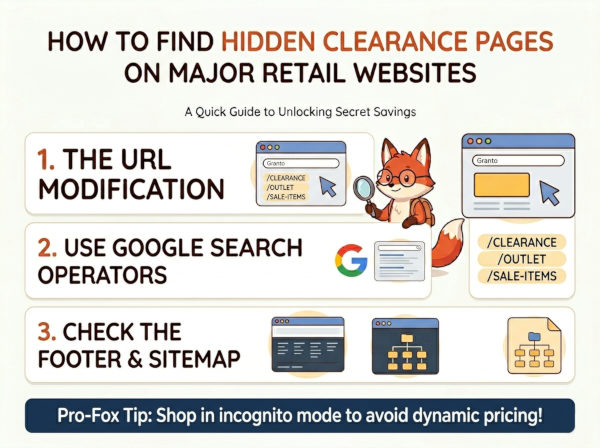
We love the thrill of the hunt, but let’s be honest: clicking on the generic "Sale" tab on a major retailer's homepage is usually a waste of time. Most of the time, those pages are filled with picked-over inventory and sizes you don't need. But what if you could access the secret, indexed pages that stores try to hide to avoid devaluing their brand? Welcome to The Hidden Clearance Hunt.
This is one of the most effective smart money lifehacks for finding massive markdowns that the average shopper never sees. Today, we will show you exactly how to bypass the main menu and use technical sleuthing to find the best deals, keeping your wallet fat while everyone else pays full price.
How the Algorithm Works (And How to Exploit It)
Retailers rely on standard URL structures for their e-commerce platforms like Shopify, Magento, or BigCommerce. When they create a new clearance section, it almost always follows a predictable path. By manually guessing these paths, you can land on hidden inventory pages that are technically live but essentially invisible to the average visitor. You are essentially using the store's own site architecture against them to find deep-discounted inventory.
The Step-by-Step Blueprint to Find Hidden Deals
To successfully uncover these secret markdown pages, follow these specific steps:
- Step 1: The URL Suffix Hack. Take the base URL (e.g., storename.com) and append common directory names to the end. Try adding
/clearance,/outlet,/sale-items, or/final-markdownto the address bar. - Step 2: Use Google Search Operators. This is the most powerful tool for "site-sleuthing." Type this into your Google search bar:
site:storename.com "clearance". This tells Google to only show you pages on that specific site that contain the word "clearance." - Step 3: Check the Footer. If a retailer has an official outlet page, they are often legally or operationally required to link it in the site footer. Scroll to the very bottom and look for "Company" or "Support" links in small, light-grey font.
- Step 4: Check the XML Sitemap. If you really want to be thorough, type
storename.com/sitemap.xmlin your browser. This is a list of every page on the site intended for search engines. Use "Ctrl+F" to search for terms like "sale" or "clearance."
Real-World Effectiveness: Where to Look
Not every store hides their clearance, but certain categories of retailers are much more likely to utilize hidden pages to protect their margins. Refer to the table below to see which categories offer the highest potential for finding deep discounts.
| Store Category | Hidden Page Likelihood | Average Discount Amount |
|---|---|---|
| High-End Fashion Brands | Very High (90%) | 40% - 70% Off |
| Large Home Decor Chains | High (65%) | 30% - 50% Off |
| Specialized Tech Outlets | Medium (40%) | 15% - 30% Off |
| Mass-Market Retailers | Low (10%) | 10% - 20% Off |
What to Do If You Can't Find Hidden Pages?
If your search operator and URL guesses yield zero results, the retailer may have truly cleaned out their inventory or uses a different system. Don't panic; you still have two backup options to find the items you want at a lower price point:
1. The "Wayback Machine" Technique
If you suspect a brand has a secret outlet that they only open during specific seasons, go to the Internet Archive's Wayback Machine. Enter the brand's URL and look for snapshots from previous months to see if an "outlet" link appeared in the navigation bar at different times of the year.
2. Subscribe to "Back-in-Stock" Alerts
If you find a specific product you want, sign up for the email alert for that item. Often, when a retailer does a "secret" restock or clearance move, these automated systems will email you before the item appears on any public-facing page. You can use the following script in the live chat if you need help: