Hidden Discretionary Spending: How to Track and Cancel Ghost Subscriptions
It happens silently. You sign up for a free trial to watch a single documentary, tell yourself you will cancel it tomorrow, and then completely forget about it. Six months later, you realize $14.99 has been leaving your bank account every single month. This is the reality of ghost subscriptions—hidden discretionary spending that bleeds your finances dry without you ever noticing.
Welcome to The Ghost Subscription Guide. In the modern digital economy, subscription-based business models are designed to exploit human forgetfulness. Corporations make signing up a single-click process but hide the cancellation button behind layers of confusing menus. Today, we will show you how to take control of your cash flow, run a comprehensive digital audit, and force these financial vampires out of your bank statements.
The Silent Bleed: Why Micro-Transactions Add Up
Most consumers think they know exactly where their money goes. You remember the rent, the car payment, and the main streaming package. However, retail banking data shows that the average consumer underestimates their monthly subscription spending by over $100. Those forgotten fitness apps, premium cloud storage tiers, and niche news sites act like thousands of tiny leaks in a water pipe—eventually causing the whole system to lose pressure.
The 4-Step Blueprint to Audit Your Accounts
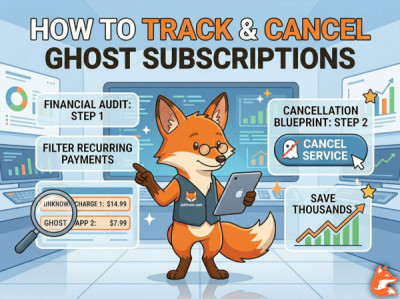
To successfully uncover and eliminate every single hidden charge, you need to execute a systematic financial audit. Follow these steps meticulously:
- Step 1: Download 3 Months of Raw CSV Statements. Do not just look at your mobile banking app dashboard. Log into your bank and credit card portals on a desktop computer and download your last 90 days of transactions as a spreadsheet file.
- Step 2: Filter by Recurring Keywords. Use the search or filter function in your spreadsheet to look for words like "AUTOPAY," "RENEWAL," "BILL," "STMT," or specific platform names like "Google," "Apple," or "Roku."
- Step 3: Categorize Every Repeating Number. If you see an identical dollar amount leaving your account on the exact same date every month, highlight it. If you do not recognize the merchant name, paste it directly into a search engine alongside the word "subscription."
- Step 4: Execute Immediate Cancellation. Once identified, do not hesitate. Go straight to the platform and cancel the service. If they make the process difficult, use the automated scripts outlined below.
Where Are Your Subscriptions Hidden?
Subscriptions do not just bill your credit card directly; they frequently hide inside third-party payment ecosystems, making them completely invisible on standard bank statements.
| Where It Is Hidden | How to Find It | Difficulty to Cancel |
|---|---|---|
| Apple App Store / iOS | Go to iPhone Settings > Tap Your Name > Subscriptions | Easy (One-click toggle) |
| Google Play Store | Open Play Store app > Tap Profile Icon > Payments & Subscriptions | Easy (One-click toggle) |
| PayPal Pre-Approved Payments | Settings > Payments > Manage Automatic Payments | Medium (Hidden in desktop layout) |
| Direct Merchant Billing | Requires logging directly into the merchant's specific website | Hard (Often requires chat bots or phone calls) |
How to Cancel When the Website Hides the Button
Some companies use malicious user interface designs (dark patterns) to prevent you from canceling. If you encounter an online service that forces you to text a number or go through a 10-step exit survey, use these two counter-strategies:
1. The Live Chat Retention Bypass Script
If you are forced to chat with a customer service representative who tries to save the account by offering you partial discounts, drop this exact message into the chat window to cut through the script:
By using the phrase "corporate restructuring" or stating a firm compliance rule, the representative's system flags you as a non-negotiable exit, forcing them to skip the retention pitch and process the request instantly.
2. The Bank Chargeback Threat
If a merchant continues to charge your card after you have submitted a cancellation request, do not waste time arguing with them. Contact your credit card issuer, present your original cancellation confirmation email, and file a formal billing dispute. Banks take unauthorized recurring transactions incredibly seriously, and the merchant will be penalized with heavy dispute fees.