Digital Minimalism: How to Clean Your Smartphone for Ultimate Focus
Your smartphone is the most sophisticated distraction machine ever engineered. It is designed to hijack your dopamine loops, fragment your attention, and ensure that you never have a single moment of boredom—or deep thought. Most people try to fix this by using "willpower," but willpower is a finite resource. To achieve ultimate focus, you must stop fighting the machine and start stripping away its psychological leverage.
Welcome to The Digital Minimalism Protocol. This is not about deleting all your apps and moving to the woods; it is about re-engineering your device to serve your goals, rather than the goals of corporate advertising algorithms. Today, we will deconstruct the specific steps to "ghost" your smartphone’s attention-grabbing features and transform it into a lean, focused operational tool.
The Minimalism Deconstruction: Stripping the Noise
Modern mobile operating systems are cluttered with "micro-distractions"—red notification bubbles, badges, and suggested content feeds—that provide zero value but high cognitive cost. You need to perform a systematic purge of every signal that isn't essential to your operational success.
The 4-Step Smartphone Sanitization Blueprint
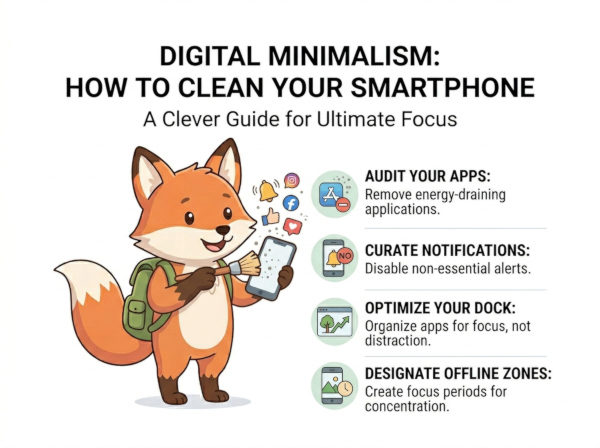
- Step 1: Execute a Total Notification Lockdown. Go into your settings and disable *all* notifications, except for essential communication (phone calls and direct messages). If an app is not critical for your immediate safety or high-priority work, it does not deserve to interrupt your flow.
- Step 2: Implement "Greyscale Mode." Your brain is wired to respond to the bright, saturated colors used by app icons to trigger rewards. Switch your screen settings to monochrome (Greyscale). This immediately makes your phone feel like a utility tool rather than a casino-style game, drastically reducing the "pull" to check it.
- Step 3: Clear the Home Screen. Your home screen should only contain the absolute essentials: a calendar, a notes app, a map, and your phone/messaging tools. Move all addictive apps (social media, browsers, news) into nested folders on the second or third page. This adds "friction" to the act of opening them.
- Step 4: Audit and Delete. If you haven't opened an app in the last 30 days, it is digital clutter. Delete it immediately. If you need it later, you can reinstall it. Removing the app icon removes the temptation to engage with the platform out of boredom.
The Minimalism Matrix: Distraction vs. Utility
Use this matrix to categorize your current digital environment and decide which tools are truly enhancing your life and which are merely parasitic.
| Metric | The Standard Distraction Setup | The Digital Minimalist Protocol |
|---|---|---|
| Notification Flow | Constant, loud, and triggered by every app interaction. | Strictly silenced; only human-to-human alerts remain active. |
| Visual Interface | High-contrast colors and red notification "badges." | Greyscale; utilitarian, flat, and focused on function. |
| App Accessibility | Every app is one tap away on the home screen. | High-friction; addictive apps hidden deep within folders. |
| Core Utility | Entertainment Engine: Designed for endless consumption. | Focus Utility: Designed for specific, purposeful interaction. |
The "Sanitized Device" Operational Code
When you effectively sanitize your device, you will notice a sudden, uncomfortable "void" where your distractions used to be. Do not rush to fill it with new noise. Use this internal logic to maintain your device as a focused instrument:
By enforcing these boundaries, you stop being a passive consumer of digital noise and regain your role as an active owner of your own attention. You will find that when your smartphone stops screaming for your focus, your brain naturally re-engages with the high-impact work that actually moves your career forward. Master the minimalism, and you reclaim the mental clarity necessary to execute your most critical objectives.