How to Organize Your Digital Life: Files, Emails, and Password Security
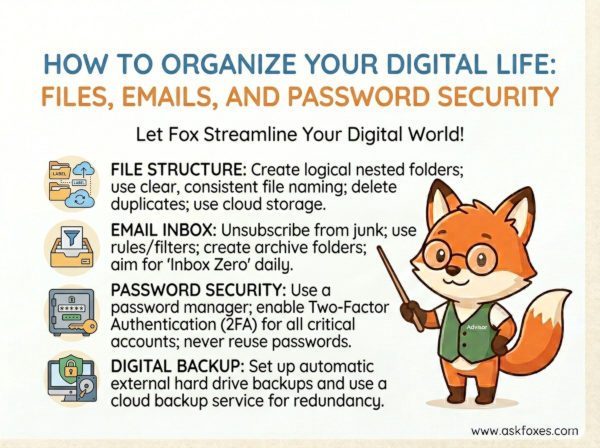
Your digital environment is a reflection of your cognitive state. If your desktop is a graveyard of "Untitled" files, your email is an unread abyss, and your passwords are stored on sticky notes, you are operating with massive hidden overhead. Digital disorganization is a tax on your focus. To perform at an elite level, you must architect an environment where information is stored logically and secured automatically.
Welcome to The Digital Sovereignty Framework. The goal is to move from "digital chaos" to a "frictionless operational ecosystem." Today, we will deconstruct the three pillars of digital hygiene: the PARA system for files, the "Touch-It-Once" protocol for emails, and the vault strategy for security.
The Triple-Pillar Digital Hygiene Strategy
Do not attempt to organize everything at once. Build the system incrementally by following these protocols to stabilize your digital workspace.
1. File Management: The PARA System
Stop creating sub-folders based on "dates" or "types." Use the PARA method to categorize every file on your drive:
- Projects: Active work with a deadline.
- Areas: Long-term responsibilities (Health, Finance, Car).
- Resources: Topics you are interested in for future reference.
- Archives: Completed projects or inactive areas.
Apply this structure across your computer, cloud storage, and even your Second Brain to ensure total file-system harmony.
2. Inbox Zero: The "Touch-It-Once" Protocol
Your email inbox is a to-do list created by other people. Stop using it as a storage locker. Every time you open an email, you must make a decision:
- Delete: If it’s not relevant, archive or delete immediately.
- Delegate: Forward it if someone else needs to act.
- Do: If it takes < 2 minutes, do it now.
- Defer: If it takes longer, move it to a "To-Do" folder/app and get it out of your inbox.
Aim for an empty inbox at the end of every day.
3. Security: The Vault Strategy
Stop using the same password for everything. It is a massive liability. Use a reputable, open-source password manager (like Bitwarden or KeePassXC) to generate and store unique, 20+ character passwords for every single account you own. You only need to remember one strong "Master Password." Enable Two-Factor Authentication (2FA) on all critical accounts, using an authenticator app (not SMS) for maximum security.
The Digital Sovereignty Matrix
Compare the chaos of reactive management with the efficiency of a standardized, secure digital life.
| Metric | Reactive Digital Chaos | Sovereign Digital System |
|---|---|---|
| File Discovery | Search-heavy; 5-10 minutes to find documents. | Intuitive; location is dictated by PARA structure. |
| Communication | Inbox is a graveyard of unread/pending items. | Inbox is a clean operational filter. |
| Security | Password reuse; high risk of credential stuffing. | Unique, vaulted, 2FA-secured identity. |
| Operational Load | Draining: Constant "clean-up" stress. | Optimized: System maintains itself automatically. |
The "Digital Sovereignty" Operational Code
To keep your digital life clean, treat your files and passwords like corporate infrastructure. Execute this logic daily to maintain your system's integrity:
By enforcing these standards, you stop being a digital packrat and become a digital architect. You reclaim the time wasted on "looking for things" and gain the peace of mind that comes with a secure, organized foundation. Master your digital environment, and you will find that your output quality improves simply because your tools are no longer fighting you.