Smart Home Tech on a Budget: How to Automate Your House Cheaply
Automating your home is often perceived as an expensive, premium luxury reserved for high-end tech enthusiasts. In reality, modern smart home technology has reached a point of commoditization where you can achieve professional-grade automation on a minimal budget. The key is not to buy the most expensive "all-in-one" systems, but to build a modular setup that prioritizes functional utility over brand-name prestige.
Welcome to The Budget Smart Home Protocol. Automating your house isn't about voice-commanding your lights for the sake of it; it is about engineering your environment to save energy, increase security, and reduce daily friction. Today, we will deconstruct the low-cost hardware strategy to turn any standard apartment or house into a responsive, automated command center.
The Hardware Selection Strategy: Low Cost, High Utility
The biggest mistake in home automation is buying bundled "Starter Kits." These are usually overpriced and include devices you don't actually need. Instead, buy exactly what you need to solve specific, high-frequency friction points, such as lighting control, climate management, or security monitoring.
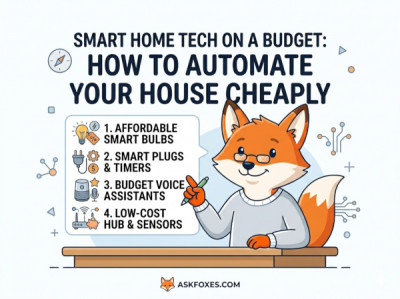
The 4-Step Blueprint to Budget Automation
- Step 1: Start with Intelligent Lighting. Skip the expensive smart bulbs that require a bridge. Purchase generic, Wi-Fi-enabled smart plugs or standard smart bulbs that connect directly to your home network. Use these to automate lamps that are used daily, creating the illusion of a full-home system for a fraction of the cost.
- Step 2: Leverage Virtual Assistants as Hubs. You do not need a $300 custom-installed smart home controller. Use a base-model smart speaker (like an Echo Dot or Nest Mini)—often found on sale for under $30—to serve as the central command node for all your devices.
- Step 3: Optimize Climate via Smart Scheduling. You don't need a top-tier "learning" thermostat. A simple, programmable smart thermostat or even a smart-enabled AC controller can automate your climate based on time, saving you significantly on energy bills over the course of a year.
- Step 4: DIY Security Monitoring. Instead of paying for a subscription-based home security system, invest in two or three standalone, high-definition smart cameras that offer free cloud or local storage. Place these at primary ingress/egress points for maximum impact on a minimal budget.
The Automation Matrix: High-Value vs. Low-Utility Hardware
Focus your budget on hardware that provides daily, tangible value rather than novelty features that you will stop using after a week.
| Device Category | Budget-Optimized Choice | Overpriced/Unnecessary Choice |
|---|---|---|
| Hub/Controller | Entry-level Smart Speaker (Echo/Nest Mini). | Dedicated touchscreen command consoles ($200+). |
| Lighting | Generic Wi-Fi smart plugs/bulbs. | "Luxury" branded color-changing bulb systems. |
| Climate | Programmable/Connected Smart Thermostat. | Premium AI-driven hyper-optimization systems. |
| Home Value | Efficiency-Driven: Focus on energy and time savings. | Novelty-Driven: Focus on gimmick features and status. |
The "Low-Cost Automation" Operational Code
When you start deploying these devices, maintain your budget by strictly adhering to a "Problem-First" acquisition strategy. Do not buy a device because it looks cool; buy it only if it solves a specific, repeatable inefficiency in your daily home life.
By following this blueprint, you transform your house into a high-efficiency smart home for the price of a few professional dinners. You are not just buying gadgets; you are buying back time and reducing your monthly energy overhead. Build your system one device at a time, prioritize open standards, and enjoy a smarter, more automated living environment that actually pays for itself over time.