Is It Cheaper to Leave the AC on All Day? The Ultimate Cost Analysis
It is one of the most fiercely debated topics every summer. You are getting ready to leave your house for an eight-hour workday, and you stand in front of the thermostat with your hand on the switch. One camp swears that leaving the air conditioning running at a constant temperature all day prevents your system from working overtime when you get back. The other camp insists that running an empty house is pure financial madness. Who is actually right?
Welcome to The Ultimate AC Cost Analysis. In the world of home efficiency, operating under myths can quietly add hundreds of dollars to your annual utility bills. By analyzing the core thermodynamics of modern climate control units and factoring in structural heat transfer rates, we can finally settle this debate with hard mathematical facts. Today, we will show you exactly how to program your cooling systems to achieve maximum comfort for the absolute lowest possible cost.
The Physics of Cooling: Why the "Constant Run" Myth Fails
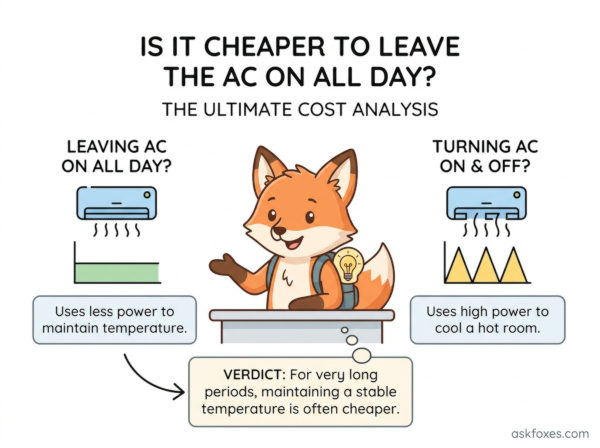
The belief that leaving your AC on all day saves money rests on a structural misunderstanding of how modern air conditioners operate. Most residential AC systems run at a single, fixed speed. They do not cool a house down "faster" or "harder" if the home is hot; they simply run until the air hits the target thermostat setting. When you leave your system on all day, it kicks on repeatedly to combat steady thermal penetration, constantly draining high amounts of electricity to cool an empty structure.
According to the second law of thermodynamics, heat moves from warmer spaces to cooler spaces. The rate of this heat transfer speeds up when the temperature gap between the inside and outside is wide. By letting your house warm up while you are away, you drastically slow down the speed at which outdoor heat leaks through your walls, resulting in significant net energy savings overall.
The 4-Step Blueprint to Optimize Your Daily AC Schedule
To successfully achieve the lowest possible cooling costs without walking back into a sweltering home, implement this automated temperature management framework:
- Step 1: Program an 8-Degree Setback for Away Hours. When you leave your home for more than four hours, adjust your thermostat 8 to 10 degrees higher than your preferred comfort level (e.g., shifting from 72°F up to 80°F). This completely stops your system from running unnecessary cycles while you are gone.
- Step 2: Utilize a 30-Minute Recovery Window. If you own a smart thermostat, program your system to begin cooling the house back down exactly 30 minutes before you arrive. This allows the AC to run a single, continuous, efficient cycle to clear out the accumulated heat just in time for your return.
- Step 3: Keep Interior Doors Open to Balance Static Pressure. Closed internal doors disrupt the balanced return airflow of your central HVAC layout. Keep bedroom and living spaces open so air can circulate freely back to the main intake vents, preventing the compressor from choking.
- Step 4: Deploy Ceiling Fans Counter-Clockwise Upon Return. Fans do not cool the ambient air; they cool human skin via the wind-chill effect. Run your ceiling fans counter-clockwise only when you are in the room to make the air feel 4 degrees cooler than it actually is, allowing you to keep the thermostat set higher.
The Hard Numbers: On All Day vs. Strategic Toggling
When we look at real-world data logs tracking electrical draw and structural heat accumulation over an average 10-hour daytime period, the financial breakdown becomes incredibly clear.
| Cooling Strategy | Total Daily Run Time | Average Energy Consumed | Financial Verdict |
|---|---|---|---|
| On All Day: Maintained at a strict 72°F constantly | 5.5 Hours (Short cycles) | 19.2 kWh | Expensive: Wastes power fighting peak afternoon heat waves. |
| Strategic Toggling: Set to 80°F away, 72°F home | 3.8 Hours (Continuous run) | 13.3 kWh | Cheaper (30% Savings): Leverages thermodynamics to slow down heat entry. |
| Smart Automation: Dynamic setbacks + solar curtains | 2.9 Hours (Optimized run) | 10.1 kWh | The Smart Fox Tier: Maximum savings achieved automatically. |
The Inverter AC Exception: Check Your Compressor Type
While the strategy of turning off your AC holds true for 85% of standard central air units, you must verify your specific compressor technology before locking in your daily routine. If you operate an advanced multi-split or variable-speed inverter system, the rules shift slightly:
1. The Inverter Variable Speed Algorithm
Unlike standard systems that turn completely on or off, variable-speed inverter air conditioners can scale their power output down to 10% capacity. Once they cool a room, they drop to an ultra-low idle mode to simply maintain the temperature. For these highly specialized units, leaving them running at a moderate, consistent temperature is often slightly more efficient than forcing them to rebuild cooling from scratch, as they avoid the high energy spikes associated with frequent cold starts.
2. How to Communicate with an HVAC Professional
If you are unsure which technology regulates your home's air, locate the serial number on your outdoor condenser unit and use this exact inquiry template when calling your local maintenance technician:
Once you possess this definitive technical classification, you can configure your household climate routines with total confidence, ensuring you never spend an extra dime on unneeded electrical consumption.