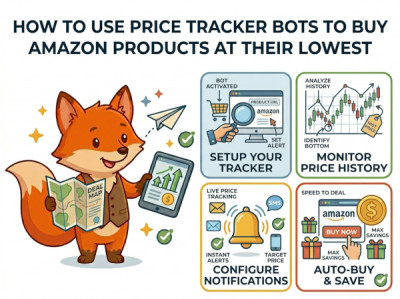
How to Use Price Tracker Bots to Buy Amazon Products at Their Absolute Lowest
We have all been there. You buy a new pair of headphones or a kitchen appliance on Amazon, only to check the listing three days later and find out the price has suddenly dropped by 25%. It feels like a punch to the wallet. Amazon changes its product prices millions of times a day using dynamic AI algorithms, making it almost impossible for a human to guess when to click "Buy."
Welcome to The Price Tracker Exploits. Instead of guessing, digital bargain hunters use automated bots to look at the historical data, map the price waves, and get alerted the exact second an item hits its rock-bottom price. Today, we will show you how to use these free tools to outsmart Amazon's pricing engine.
How Amazon's Dynamic Pricing Works (And Why It Fluctuate)
Amazon does not use static price tags. Their algorithm monitors competitor inventory, regional demand, global supply chain shifts, and even your own browsing history to calculate prices in real-time. A product can cost $45 in the morning, surge to $58 by lunchtime, and crash to $39 at midnight. If you buy during a high-demand spike, you are overpaying by default.
The Step-by-Step Blueprint to Automate Your Savings
To successfully catch a product at its absolute historic low without spending all day refreshing the page, follow this exact blueprint using free tracking tools like CamelCamelCamel or Keepa:
- Step 1: Install the Tracker Extension or Bookmark the Tool. Add a reputable free tracker extension to your browser or simply keep the tool's website open in a tab.
- Step 2: Copy and Paste the Amazon URL. When you find an item you want on Amazon, copy its link and paste it into the price tracker's search bar.
- Step 3: Analyze the Price History Chart. Look closely at the graph. Identify the "Absolute Low" (the lowest price the item has ever reached) and see how often it drops to that level (e.g., once a month, only during Black Friday, etc.).
- Step 4: Set a Custom Price Alert Bot. Enter your target price (usually 5% above the historic low to be realistic) and drop your email address. Close the tab and let the bot do the heavy lifting.
Real-World Effectiveness: Which Categories Are Worth Tracking?
While grocery items and cheap everyday consumables have highly stable prices that rarely justify tracking, specific categories like consumer electronics, seasonal appliances, and fitness gear experience massive, highly predictable price swings.
| Product Category | Price Volatility | Average Potential Savings |
|---|---|---|
| Laptops, Headphones & Tech | Extremely High (90%) | 20% - 35% Off |
| Kitchen & Home Appliances | High (75%) | 15% - 30% Off |
| Fitness Equipment & Tools | Medium (50%) | 15% - 20% Off |
| Books & Everyday Groceries | Very Low (10%) | Rarely more than 5% fluctuation |
What to Do If a Product Never Drops?
If you have been waiting for weeks and your price tracker bot hasn't triggered an alert, Amazon's algorithm might have locked the price due to high baseline demand. Don't throw away your money just yet; you have two backup options:
1. The "Used - Like New" Warehouse Exploitation
Go back to the tracker chart and look specifically at the **Used** history line. Many buyers return items simply because they changed their mind or the outer cardboard box was slightly dented. Amazon re-lists these under the "Warehouse Deals" tag as "Used - Like New," often discounting them by 30% instantly while retaining the same exact return policy.
2. Deploy the Lightning Deal Snatcher Script
If you are tracking an item during promotional weeks (Prime Day, Holiday Sales), standard email alerts might arrive too late because stocks vanish in minutes. Go to your bot's advanced settings and set up push notifications via Telegram or Discord Webhooks using this logic:
TRIGGER immediate_push_notification;
EXCLUDE third_party_unfulfilled;
This ensures you are notified within seconds of a lightning deal going live, letting you secure the item before the inventory pool is depleted by automated scalper bots.