Strategic Laziness: How to Automate 50% of Your Remote Job Tasks
The transition to remote work was promised as a revolution in personal autonomy and work-life balance. Yet, for millions of professionals, corporate communication infrastructure has merely shifted the exhaustion from a physical office to a digital one. Your day is quietly consumed by a relentless stream of administrative busywork: formatting identical weekly status trackers, answering the same five regional client inquiries, and manually logging deliverables into complex project management dashboards. You are working longer hours, but your actual creative and strategic output is hitting an absolute ceiling.
Welcome to The Strategic Laziness Manifesto. High earners in the tech and corporate sectors do not survive by pushing through brute-force manual labor; they survive by treating their daily calendar as a software engineering problem. Strategic laziness isn't about neglecting your core professional duties—it is the deliberate art of automating low-leverage, repetitive data loops so you can reclaim your time sovereignty. Today, we will lay out the exact automation framework to quietly erase 50% of your manual remote task load while keeping your performance metrics at a peak level.
The Digital Assembly Line: Identifying Your Automation Targets
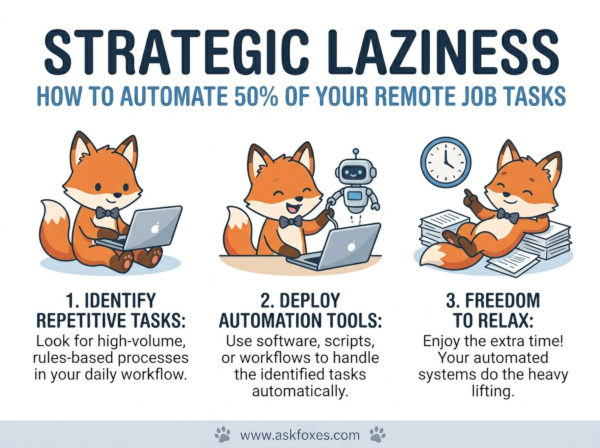
To successfully optimize your remote workflow, you must separate your high-value cognitive tasks from your low-value mechanical habits. If a task requires deep emotional intelligence, critical systemic negotiation, or highly creative original synthesis, it belongs in your human focus zone. However, if a professional task follows a predictable, repeating rule-based structure (such as dragging data from an email into a spreadsheet or sending a standardized team alignment ping), it represents an immediate target for software-driven delegation.
Corporate managers evaluate remote workers on two primary metrics: delivery accuracy and communication visibility. By automating the mechanical generation of these items, you remove the risk of human typographical errors entirely, creating a paradox where being strategically lazy actually elevates the perceived quality and consistency of your corporate output.
The 4-Step Blueprint to Streamline Your Daily Workload
To successfully build an automated insulation layer around your remote position without triggering IT security flags or corporate monitoring software, execute this systematic strategic setup:
- Step 1: Deploy a Local Text-Expansion Ecosystem. Stop typing out long, identical emails, standard progress summaries, or boilerplate code blocks by hand every day. Use local desktop text expanders to map complex phrases, greeting templates, and operational updates to tiny, specific keyboard shortcuts (e.g., typing ";status" instantly triggers a perfectly formatted 300-word team progress matrix).
- Step 2: Construct No-Code Logic Bridges Between Core Apps. If your job requires moving data between files, chat channels, or task layers, stop copy-pasting manually. Use background web automation engines to link your workspace applications. Program a simple multi-app recipe: when a client uploads an asset to your shared drive, the script automatically renames the file, drafts a tracking ticket, and pings your project channel entirely in the background.
- Step 3: Engineer AI-Driven Dynamic Template Engines. For writing tasks that require a minor touch of personalization—such as regional industry recaps or long meeting summaries—build a highly specific contextual prompt database inside your AI tools. Feed the system raw data points or messy unedited notes, and let the artificial intelligence structure, polish, and tone-match the output to your personal professional writing style in seconds.
- Step 4: Script Your Communication Visibility. Remote visibility is often artificially judged by how active your status circle appears. Use platform-native scheduling features to stagger your automated status reports, project hand-offs, and routine announcements across the entire business day, creating a highly visible, consistent operational presence while you are away from your desk focusing on personal growth.
The Workflow Efficiency Spectrum: Manual Grinding vs. Strategic Laziness
Mapping out your daily responsibilities across an automation matrix allows you to systematically identify and eliminate hidden time leaks before they exhaust your cognitive energy.
| Remote Responsibility | The Traditional Manual Approach | The Strategically Lazy Automation Model |
|---|---|---|
| Project Status Tracking | Manually typing daily updates and sorting through message threads before logging out. | Using a linked spreadsheet template that automatically compiles weekly data changes into a clean dashboard look. |
| Inbound Inquiry Handling | Drafting unique, lengthy responses to recurring operational questions by hand. | Triggering immediate, structured template blocks using local keyboard shortcut triggers. |
| Meeting Documentation | Taking frantic manual shorthand notes during calls, formatting, and emailing them to the team. | Running a local transcription tool, dropping the raw audio text into an AI summary template, and scheduling the recap. |
| Professional Result | Digital Burnout: Sinking hours into administrative busywork with zero time for skill advancement. | Asynchronous Autonomy: Meeting all output goals instantly while carving out open hours for strategic projects. |
The Professional Freedom Configuration Code
When implementing these background optimization routines, you do not need to overcomplicate your digital workspace setup. True structural optimization relies on simple, repeatable rules that isolate your core workspace assets from human distraction. Calibrate your background digital layout to act like an unyielding filter system using this precise operational logic:
By shifting your daily professional efforts away from raw manual volume and toward systemic efficiency, you fundamentally rewrite your relationship with your remote career. You stop viewing a corporate position as an endless trade of your physical hours for a baseline salary, and begin viewing it as an optimized system designed to reward output quality over busywork. True workplace mastery isn't about running yourself ragged to look constantly occupied—it is about possessing the absolute, quiet sovereign freedom to deliver flawless professional value while completely controlling your own time.