How to Ghost Your LinkedIn Profile to Hunt for Jobs Safely While Employed
Updating your professional profile while actively employed is a high-stakes balancing act. One wrong setting change, one overly eager "Open to Work" frame, or a sudden burst of activity can trigger an automated notification to your current manager, signaling that you are looking for an exit. But in the modern professional landscape, relying solely on job boards while keeping your profile dormant is equally ineffective. You need a strategy to make your profile a powerful magnet for recruiters while simultaneously rendering it completely invisible to your internal corporate circle.
Welcome to The Tactical Ghosting Protocol. To hunt for new opportunities safely, you must shift your profile from a public broadcasting station to a precision-targeted search engine. By deploying specific privacy shields and high-impact metadata adjustments, you can signal your value to the open market while maintaining total professional cover in your current role. Today, we will deconstruct the exact privacy configuration required to hunt for your next breakthrough role with zero internal detection risk.
The Stealth Stack: Shielding Your Activity Loop
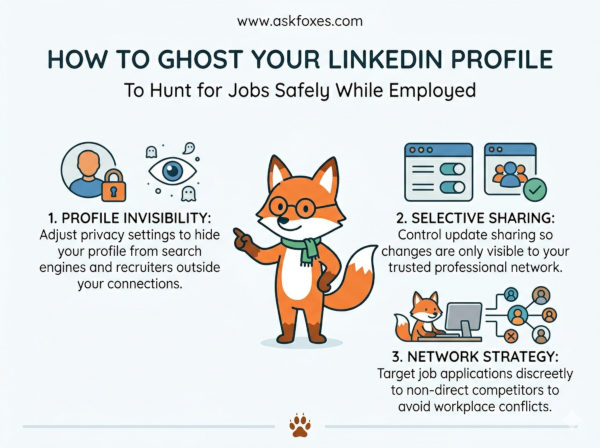
Corporate managers and internal HR teams are frequently alerted to job-seeking behavior by automated platform triggers. The most common "leak" is the "Open to Work" green frame, which creates a highly visible alert across your professional network. Furthermore, frequent profile edits, such as adding new technical skills or changing your job title, can ping your current teammates with notifications. Your primary goal is to turn off these broadcasting layers before you begin your search.
To hunt safely, you must move your activity into the background. By deactivating the "Share Profile Updates" notification, you ensure that every tweak to your experience section remains a silent, private edit. By customizing your "Open to Work" signal strictly for recruiters rather than displaying it publicly, you create a private funnel where only external headhunters see your availability, shielding your status from anyone within your current corporate network or its subsidiary branches.
The 4-Step Blueprint to Ghost Your Digital Presence
To successfully prepare your profile for a high-impact job search while remaining completely hidden from your current employer, execute this systematic privacy framework:
- Step 1: Lockdown Your Notification Broadcasting. Navigate to your profile's "Visibility" settings and immediately toggle off the "Share profile updates with your network" option. This ensures that every edit you make to your work history, skills, or professional summary happens in total silence, triggering no alerts to your manager or current coworkers.
- Step 2: Initialize Targeted Recruiter Signals. Enable the "Open to Work" feature, but select the "Recruiters only" visibility setting rather than the public "Open to Work" photo frame. This embeds your profile into private recruiter search algorithms, ensuring that only users with Recruiter licenses see your availability, while your current company’s HR team sees nothing different on your public profile.
- Step 3: Scrub Your Outbound Network Connections. Stop adding new professional contacts from your immediate department or current client pool. If you need to network, perform your outreach to external industry peers using cold direct messages rather than public connection requests, which appear on the "people you may know" feeds of your current colleagues.
- Step 4: Audit Your Public Visibility Footprint. Review your "Public Profile" settings to restrict what logged-out users (including people searching on Google) can see. By limiting your visibility to "Only your connections" or a restricted public subset, you prevent your current management team from stumbling upon your full resume while performing standard market competitor research.
The Visibility Matrix: Public Presence vs. Tactical Stealth
Optimizing your digital presence requires balancing your need for high-quality recruiter visibility with the absolute necessity of maintaining internal operational cover.
| Profile Feature | Standard Public Approach | Tactical Ghosting Protocol |
|---|---|---|
| "Open to Work" Status | Public green photo frame; broadcasts intent to all network connections. | "Recruiters Only" setting; hidden from all connections and public feeds. |
| Profile Edits | Broadcasts every change; notifies network of "new role" or "skill added." | Toggles off "Share Profile Updates"; all edits remain silent and private. |
| Contact Info | Displays primary corporate or personal email linked to daily work. | Uses a dedicated, private job-hunt email segregated from all employer channels. |
| Search Visibility | Maximized for all users; easy for current team to find via Google. | Restricted via privacy settings; limited to specific recruiter search parameters. |
The Career Pivot Configuration Script
When executing your hidden job search, you must be disciplined about how you interact with your digital workspace. Do not treat your profile as a social feed; treat it as a silent, automated search signal that works while you focus on your daily job duties. Use this operational logic to maintain your stealth configuration:
By shifting your digital footprint into stealth mode, you regain absolute control over your career transition. You stop living in fear of accidental notification leaks and start utilizing the platform exactly as it was intended: a powerful, private tool for career advancement. You maintain your professional reputation and performance standards at your current role, while quietly curating a high-value opportunity pipeline that operates entirely in the background, ensuring your next move is calculated, private, and perfectly aligned with your long-term sovereignty.